Facebook Changed Pages – What That Means For You
April 8, 2022
CONSUME CREATIVELY
This content is available in:
AUDIO
TEXT
It’s the biggest change Facebook has made to a core functionality in a really long time, but we don’t need to panic yet.
Pages, they are a-changing
First, you’ll see an explosion of confetti, which we like! It appears the first time you visit a Page that’s been converted to new Pages experience. The overall look isn’t going to be too different than what you’re already familiar with.

These changes are a slow and random rollout eventually coming for all Pages. You may have already had the option to convert, which you could opt out of at that time. You can hold out for a little while longer, but this change is definitely coming, and it’s not going to be optional for long.
The Good News
From Meta (Facebook) – “all Page content including posts, photos, videos, stories, and Groups your page is an admin of will automatically move to your new Page. All of your Page followers will also be transitioned to your new Page. If your Page has a blue verification check, it will transfer to your new Page.”
The visual changes to your Page, particularly from a user level, are not super noticeable. Some menu options are called a slightly different name, but are still something you’d easily be able to figure out.

Another change you’ll notice is more tabs across the top of your Page. The information about your business or organization will be a little more spread out than it has been. Nothing too worrisome, and you can still hide tabs that aren’t relevant to your Page.
What’s Different?
TWO BIGGEST CHANGES
Permission levels changing
- No more admin, editor, moderator, etc.
- System is now task access level-based
- Make sure anyone currently with access gets the right access level
- Will be helpful if you have multiple people assisting with account management, can assign relevant tasks
- If you are currently an admin, you keep all permissions you currently have, and are able to assign tasks to others
- Anyone who was not previously an admin or editor on the Page (such as moderator or advertiser) will have task access to the Page.
- Tasks include Insights, Ads, Content and Community Activity & Messages
- If you have task access to the Page, you will not be able to switch into the new Page on Facebook. Instead, you can use other platforms from Facebook to manage the features you have access to.
- When you give someone task access to your new Page, they can use management tools to manage it.
- If they use mobile, they can manage the new Page from:
- Meta Business Suite Mobile app
- Creator Studio Mobile app
- If they use a desktop/computer, they can manage the new Page from:
- Creator Studio
- Meta Business Suite
- Business Manager
- Ads Manager
- If they use mobile, they can manage the new Page from:
Sidebar – What is Meta?
Meta announcement press release
Meta is the parent company of Facebook, Instagram, Messenger and WhatsApp. It’s also the company you buy ads from for all of those platforms, rather than purchasing from the platforms individually.
Going back to just one type of follower – with a twist…No more Likes.
- The people who like and follow you will come right along with you for the new Pages experience.
- Once you switch, or are made to switch, anyone who just likes your Page is now not associated with you
- You’re losing associations with people. Send an email to everyone on your list and tell them to follow you. Post instructions on how to follow you to your Page.
- It hasn’t been clear to people the difference between Likes and Follows
- Likes tell the algorithm you’re interested in that Page
- Follows tell the algorithm you want to receive updates from that Page
- There’s also the issue of FINDING the follow button, which is hidden in a menu, though you should get the option to Like and Follow when you first Like a Page.
- While initially the loss of Likes could be painful, you may find an increase in engagement
- The people who follow your Page really want to see and interact with your contact
- Our prediction is you’ll see lower reach, but higher engagement

Profile Management
- We’re going back to full profiles for your Pages, so you’ll need to toggle between your Page and your personal profile.
- Do this either from your newsfeed or from the Page itself.
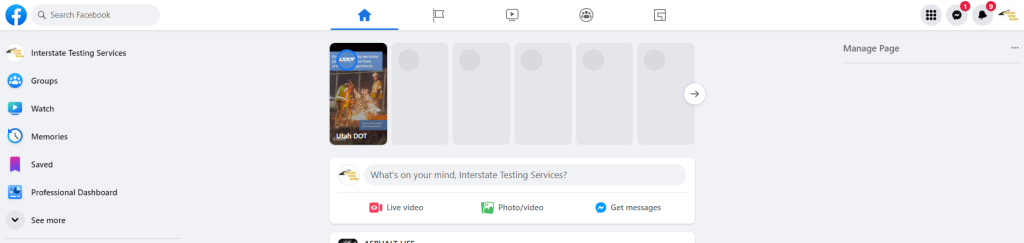
- When you got to the Page, you’ll be prompted to switch so you can manage the Page:
View before you switch:
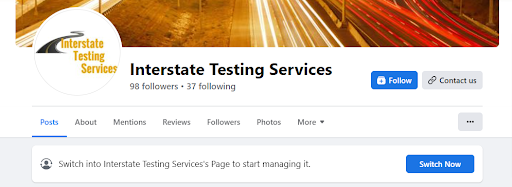
View after you switch:
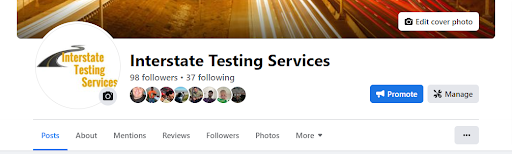
- If you’ve been on Facebook for a while, this will feel like a throw back – Used to have to switch between Page and personal profiles
- If you go to a Page as your normal profile, and switch to the Page when you click out to go to your feed you’ll still be interacting as your Page until you switch back.
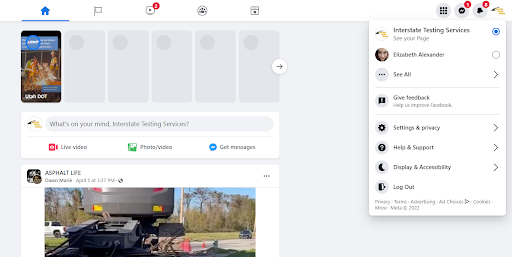
- To make that switch you’ll click on your profile image in the upper right of the screen and choose whichever profile you want to use Facebook as.
- Pages now have their own timeline where you can interact with Pages your Page follows and Groups you’ve joined as your Page
- Can also post from this view – like you can on personal account
- You will be able to interact with other accounts from your business MUCH easier, which could be a benefit to overall engagement
Bonus change to Groups
You can now invite people to join a Group via email! So make the most of your email list and find ways to engage those people through Groups.
The world is not ending, it’s just going to look a little different
Overall, it’s probable these changes will actually increase your engagement. Just keep posting good content that your audience responds to. Check out 10 Social Posts Every Fundraiser and Event Needs for ideas!
Resources from Meta/Facebook
Who Manifested This Madness?

This fabulous human, that's who.
Monica Maye Pitts
Monica is the creative force and founder of MayeCreate. She has a Bachelor of Science in Agriculture with an emphasis in Economics, Education and Plant Science from the University of Missouri. Monica possesses a rare combination of design savvy and technological know-how. Her clients know this quite well. Her passion for making friends and helping businesses grow gives her the skills she needs to make sure that each client, or friend, gets the attention and service he or she deserves.