Demystifying Keywords: How to Improve Your Org’s Google Ads
February 14, 2024
CONSUME CREATIVELY
This content is available in:
TEXT
Programs like the Google Ad Grant give nonprofit organizations a needed leg up by granting participating organizations $10,000 a month in free ad credits.
But to make effective use of these ad credits, nonprofits need to be thoughtful about the keywords their ad campaigns target. This is a common stumbling block for nonprofits and why many Google Ad Grant participants end up not making full use of their entire $10,000 monthly budget.
To ensure your nonprofit gets the most out of this grant and launches ads that attract qualified leads, this article answers three questions nonprofits often ask about keyword-based marketing.
What are keywords?
Keywords are specific words and phrases people enter into search engines to find information, navigate to specific websites, and make purchases. The actual algorithm behind search engines like Google is more complex than simply matching searchers to websites that feature the given keyword many times (otherwise the system would easily be gamed by scammers).
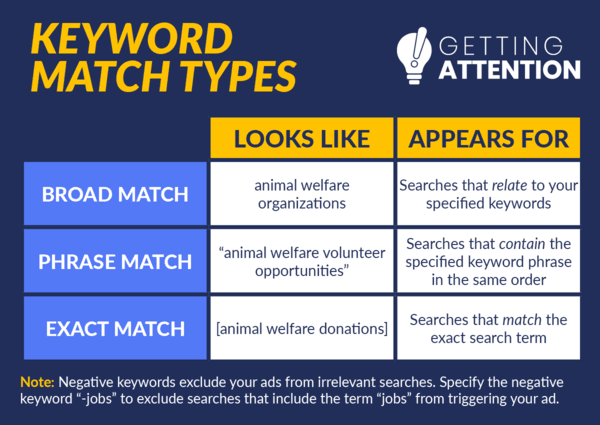
Google considers more than just the keywords queried when delivering search results. Getting Attention’s guide to Google Grant keywords breaks down how Google classifies keywords for ads:
When putting your ads together, consider how specific you want searchers’ queries to be to have your ad appear.
Broad keywords will market your nonprofit to the widest audience possible, but some leads may be unqualified. In contrast, exact and phrase matches will reduce traffic but may help you find an audience that’s more ready to convert. Determining this trade-off based on your goals for your campaigns is important because your account is charged each time your ads are served to searchers.
What keywords are your audience searching for?
When choosing keywords for your nonprofit, put yourself in your audience’s shoes. What types of terms are they likely searching for that would lead them to your website? Nonprofits can use Google Ads to attract audiences for all types of purposes, such as:
Using keywords to introduce searchers to your cause.
Consider what pages on your website are a strong introduction to your nonprofit, and what keywords a potential supporter would likely search that might lead them there.
A small portion of supporters do use search engines to find nonprofits they want to give to, but more are looking for information related to your cause.
For instance, educational content like blog posts and news stories are great content for attracting new supporters unfamiliar with a cause. A prospective supporter for an environmental nonprofit might not be initially interested in donating and instead use Google to research their local environment’s status or the potential impacts of environmental degradation.
Let’s say this supporter is searching for a keyword like “impacts of pollution on rivers.” A nonprofit dedicated to protecting rivers would have a better chance of getting this supporter interested in their organization if they promote an educational page to this supporter that answers their initial query than if they just direct them to a donation page.
Make sure to double check that all pages promoted by your ads are fully functional. Broken links and poor page design are the fastest ways to get people clicking the back button.
How much should you bid on a keyword?
Nonprofits spend their $10,000 in ad credits per month bidding on keywords, which is the process of spending money to have their ad appear for searches for a specific keyword. Bid amounts vary based on a keyword’s competitiveness. If you plan to manually set bid limits on your campaign your bids will be capped at $2.00. However, choosing to use an automated bidding strategy allows you to exceed the $2 limit.
To make the bidding process less overwhelming, Google offers automated bidding options. Google has a few different smart bidding strategies nonprofits can choose from:
Maximize Clicks
Even though it’s Google’s default option, Getting Attention’s guide to optimizing the Google Ad Grant discourages this automated bidding strategy because it focuses on clicks rather than conversions (your ultimate goal for your ads). Instead, they suggest selecting the “Maximize Conversions” bidding strategy. This will allow you to be more competitive with bidding and effectively spend more of your ad budget.
Maximize Conversions
The Maximize Conversions strategy identifies which of your keywords are resulting in the most desired actions from visitors. Then, it balances your budget by prioritizing bidding on those words and will even bid over the usual program max of $2 for these high-value keywords.
Ultimately, keep in mind that the Google Ad Grant only covers up to $10,000 in ad credits. Unspent ad credits don’t roll over from month to month, so be sure to use the right keywords and bidding strategy to utilize everything Google gives you to make the most of this program. If you want to spend more on ads in a given month, you can do so, however, your nonprofit will be responsible for paying for the extra ad spend.
The Google Ad Grant provides nonprofits with an exciting new way to market themselves to supporters and gain more traffic to their websites. Make sure you are maximizing your funding and attracting qualified leads by targeting keywords that are relevant, user-driven, and have low competition.
Who Manifested This Madness?

This fabulous human, that's who.
Monica Maye Pitts
Monica is the creative force and founder of MayeCreate. She has a Bachelor of Science in Agriculture with an emphasis in Economics, Education and Plant Science from the University of Missouri. Monica possesses a rare combination of design savvy and technological know-how. Her clients know this quite well. Her passion for making friends and helping businesses grow gives her the skills she needs to make sure that each client, or friend, gets the attention and service he or she deserves.