MailChimp VS MailerLite
February 25, 2022

CONSUME CREATIVELY
This content is available in:
AUDIO
TEXT
If your email marketing system isn’t doing what it needs to do for you and you’re considering switching to MailChimp or MailerLite – this review is for you.
I was a huge MailChimp fan…until I had to use it regularly myself. It has some very positive features. I’m not saying MailChimp isn’t right for you though, I support over 60 clients who use the system and love it.
Last year we switched from MailChimp to MailerLite but before making that decision I interviewed MANY email systems from SendInBlue to ConvertKit before settling into MailerLite. And you know what, it’s not perfect either. But it is better for me, sort of. At least I hate it less.
I’ve created new workarounds and I still have a stupid spreadsheet but at least now I don’t need google maps to find my way around. I’m going to give you my honest review after using MailerLite for the past year and a half and MailChimp for God knows how many so you can see which one might make you less pissed as you’re building your marketing emails. Here goes…
This isn’t the “I hate MailChimp show”.
What I miss MOST about MailChimp is the segmenting, what I miss LEAST is the user interface.
MailChimp has its place. Like I mentioned earlier, I have over 60 clients on the system and they are perfectly happy with MailChimp, it does what it needs to do for them. But they are often “distance users” of MailChimp. Some use it frequently but most just let the emails auto generate from their website and email me when things get weird.
When I started relying more and more on email to market my business, and then lost my email making magician, I had to start using MailChimp myself on a daily basis not just to troubleshoot but to actually administer our marketing. And I quickly found myself building spreadsheets to manage the process of building and reporting…I upgraded to the over $100 a month package thinking that’s what I needed to use the system more efficiently. But that came with it’s own set of misadventures as well.
To get the right system for you, first you need to know what you want.
When I choose an email system, or really any software or plugin, I first outline the must-haves for it to qualify as a potential solution. (I went WAAAAAAAY down the rabbit hole and explained how I evaluate systems in a blog post about investigating online event registration systems in case you’re super interested in that type of dorky mojo.)
For email marketing systems I usually evaluate:
- Email Builder
The user interface you’ll use to build emails and the features if offers. - System Usability
How easy is it to find what I need in the system and get from place to place. - Segmentation
What features does the system offer to segment my users? - Automation
Features available and ease of use to automatically send emails. - Integration
The other systems this system can talk to. Can it help lighten my load of tedium by automating a few steps in my day to day processes. - Reporting
The data it reports and the user interface through which it reports that data. - RSS Feed Emails
Does it have the features and how customizable are the emails? - Pricing
Duh. You know all about that.
Email Builder
These two systems are VERY comparable for ease of use. You can easily build an email in each user interface with little to no experience. And both systems become highly malleable with a bit of CSS and HTML knowledge.
MailerLite
It’s easy to make and save templates. I have access to the template gallery but seldom use it. They’re not super special. The landing page templates are pretty cool though.
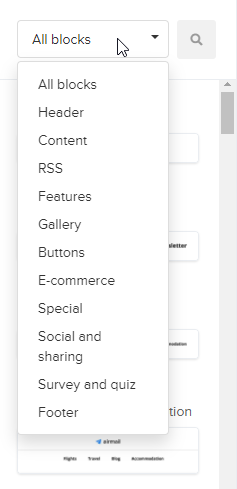
The user interface lays out in three columns. To the left are your content block options. The middle is the email you’re designing where you can drag, drop and rearrange. To the right are the editing options for the block you have selected.
There are SOOO many content blocks to choose from. Lots of different layouts with images, buttons, text all arranged and ready to drag and drop in place. All that pre-designed goodness comes with the drawback of figuring out how to customize it for your particular purpose though. I often find myself starting with a block and then ditching it to just use the normal MailChimp like blocks instead.
The load time in this program kills me. And it seems like the longer I dwell on a particular email the slower the darn thing gets. It’s so frustrating when you are working on a deadline.
MailChimp
It’s easy to make and save templates. The simple template gallery is a great starting point for most emails.
The user interface lays out in two columns. The left column shows the email you’re designing and lets you click on the content blocks you want to edit, drag and rearrange. The right houses the block editing options.
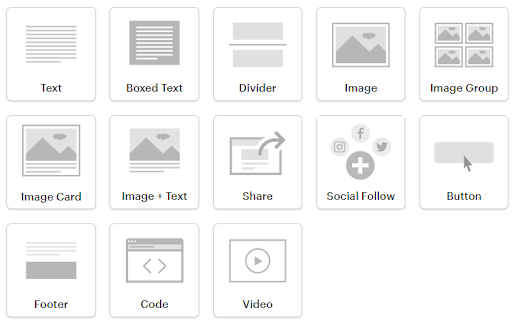
There aren’t a ton of content block options but with a bit of tweaking you certainly have enough to get the job done. Each content block has its own set of customizable parameters where you can change fonts, colors, spacing, etc.
Preview mode helps you debug potential mobile pitfalls.
The editor hops along pretty quick. There’s some lag time while things load but it’s minimal.
NOTE: You can’t schedule an email to send in the future if you don’t have a paid MailChimp account.
System Usability
MailerLite
I switched to this system because it’s easy to use. It just makes sense. The user interface has many options but they don’t overwhelm me.
I do feel like there could be some improvements for sure. When working in the user interface I do occasionally find spots when I wish there was a faster path between this and that. But for the most part I can get to where I want to go without thinking too hard.
MailChimp
I have an iphone and when I’m in this system I feel like I’m trying to operate an Android. I have to think soooo hard. And everything is buried somewhere, so much clicking. Sooo much clicking.
Segmentation
MailerLite
There are no audiences in MailerLite, so you’re missing a level of segmentation. There are also not any tags. There are groups and segments.
I feel like losing my MailChimp tags was like losing my silverware divider. All the cutlery is living in the same drawer with no way to sort it but to label each subscriber with a user field to identify it as a spoon, knife or fork.
So now my subscriber profiles are totally bloated. I have to add a subscriber field for each offering, event or anything else I ever want to sort them by.
You can add people to segments but essentially segments all you to filter your group and then save the filter. So if subscribers all have spoon in the cutlery user field you can filter for that parameter and add them to a segment.
But without the user field if you delete a segment you’ll never know if they’re a spoon or not, even if the add themselves from the spoon form. Oh the horror.
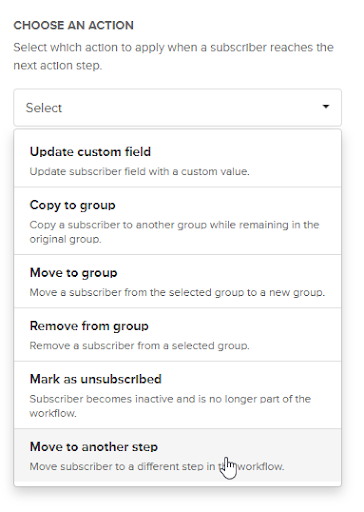
You can’t add people to anything other than groups automatically based on their email behavior. If they click on a link or subscribe it all has to be segmented using groups.
Even automations use groups:
MailChimp
This is where MailChimp really has it going on. At the tippy top you have Audiences (these don’t cross pollinate) and Audiences can be segmented into Groups and Subscribers can be Tagged as well. And on top of all that you can save segments of subscribers as well.
Now, if you’re a new email marketer tread carefully before using everything all at once willy nilly on a whim or you’ll have no idea what you’ve done or what any of it means.
I know. I totally did that.
I had a tag for “Email Webinar” and a Group for “Email Webinar” and then I saved a segment for “Email Webinar” and then I used one sometimes and another at other times. And after a while I had to make another segment with all three in the filter so I could find everyone!
I won’t go into my theory of what they should all be used for just know they’re incredibly useful. And all have their place. You’ll love them if you plan on segmenting.
Automation
MailerLite
Automations allow you to move subscribers from group to group, to other automations, update profile information, send emails based on certain dates or criteria. And you can make all those actions conditional as well.
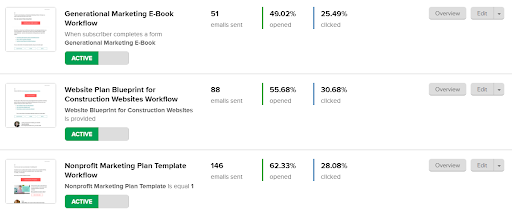
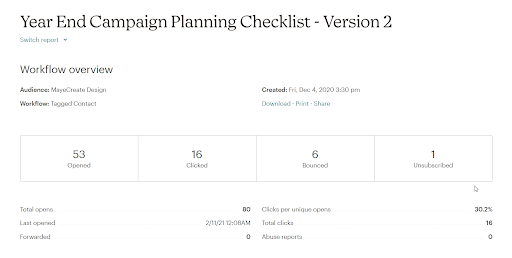
Already this system is more useful to me because it gives me data about the emails in the workflow in the overview.
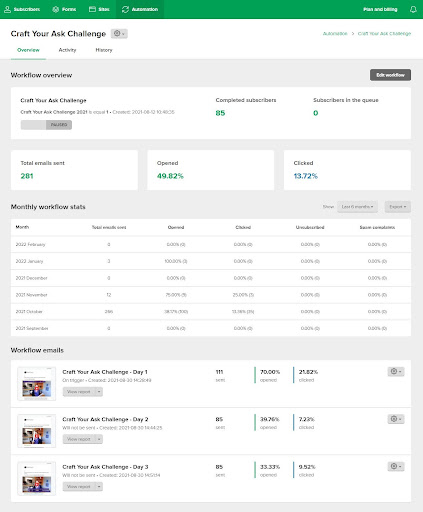
When I click into a workflow I can see more overview data.
The workflow user interface is easy to use and intuitive. Click a “+” to add more steps. Then choose the type of step you’re adding and customize the step in the right column.
Automation Features Screenshots
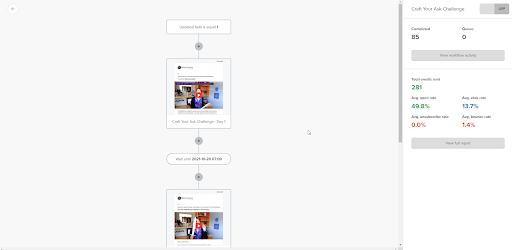
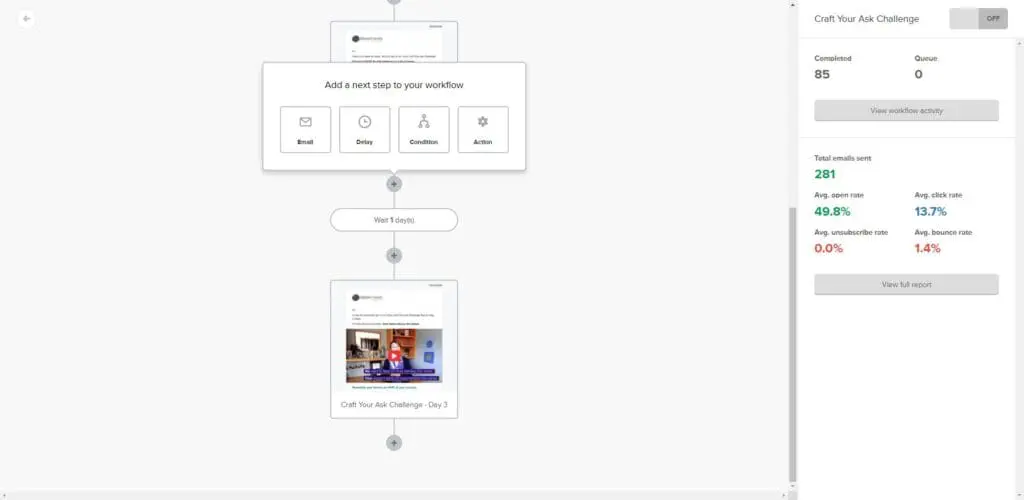
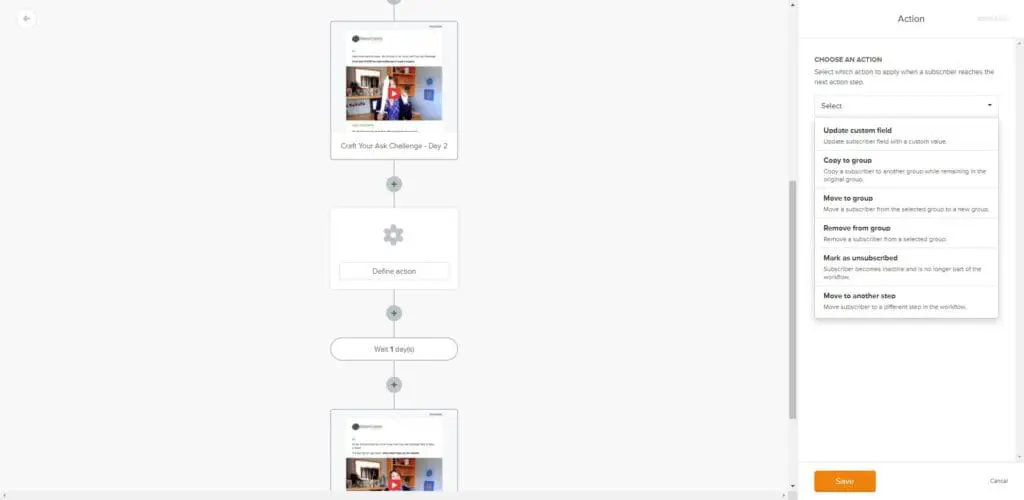
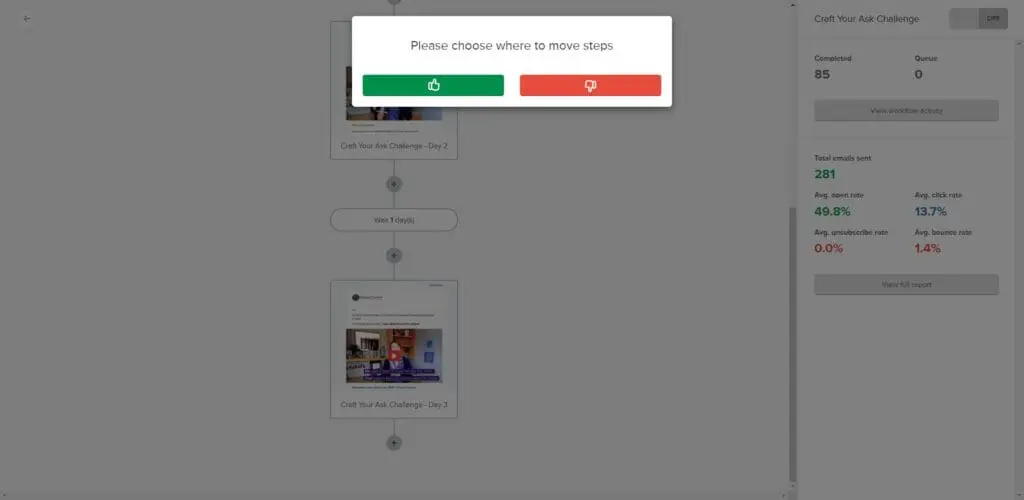
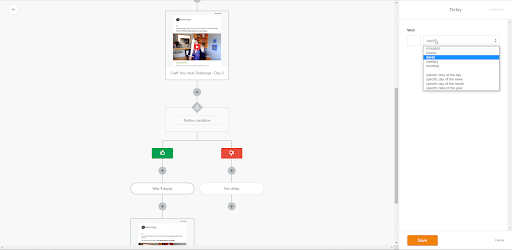
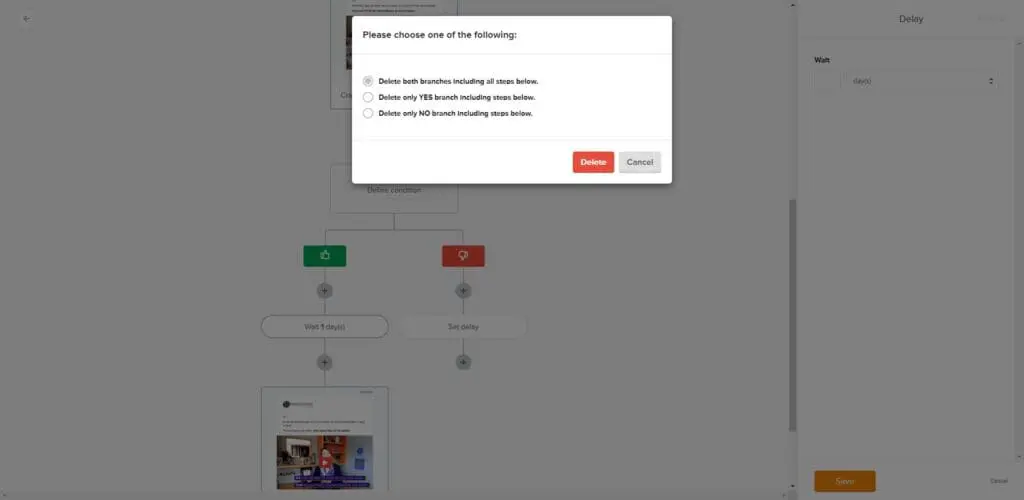
It’s easier to adjust steps in your automation.
Aaand I’d like to give a gold star to MailerLite for asking me if I want to delete all the stuff after a point in my automation when I decide to delete a step.
THANK YOU!
Because if you do this in MailChimp it deletes everything. BAM!
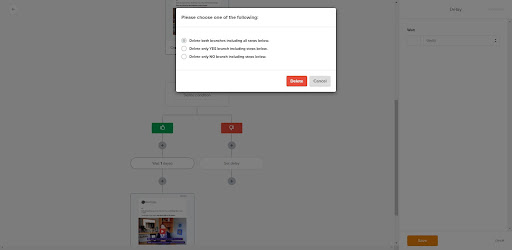
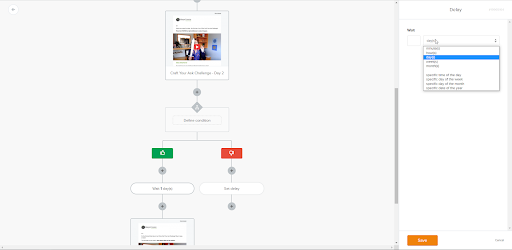
BONUS: You can actually set automations to start on a DAY of the year.
You can set an action to start on a specific date but anyone who joins after that date won’t be able to go through the rest of the automation (even those who join on the day before if you have a 1 day delay between steps).
MailChimp
MailChimp has two types of automations:
- Journeys
- Classic Automations
Other than the user interface the biggest difference between the two is Classic Automations force you to send an email with each step of the automation. So all actions are attached to an email. You can’t just tag someone or add them to a new group unless you send an email while doing it.
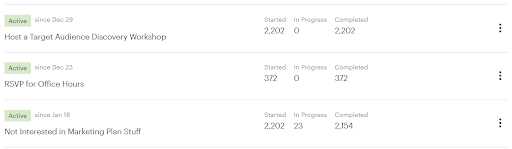
In my opinion the initial Journey overview screen is kinda a data vacuum…like as in what happened to all the data? Seems like MailChimp is always puking information at me so where is it as it pertains to my Journey’s, it’s a total mystery. Read on as I complain a bit more…
I can’t figure out where to find the data related to the emails set from a Journey in MailChimp. I refuse to believe it’s because I’m an idiot. All I see are how many people started and finished a Journey. Like I Googled it and really I am not bragging when I say I can Google like a mother. (‘Cause I am a mother, duh.) Nothin. I have GOT to be missing something.
You can however see email reports from classic automations in MailChimp. Classic automations are pretty functional but limit your flexibility to an extent because EVERY action has to include an email. With a Journey you can add people to a group, update profile information, add tags, all without sending an email.
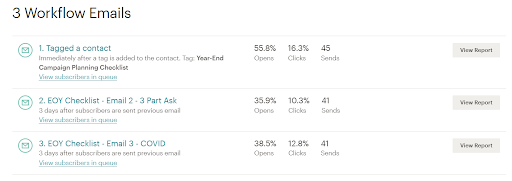
This is the user interface for active Journeys in MailChimp. These are similar to the Automations in MailerLite.
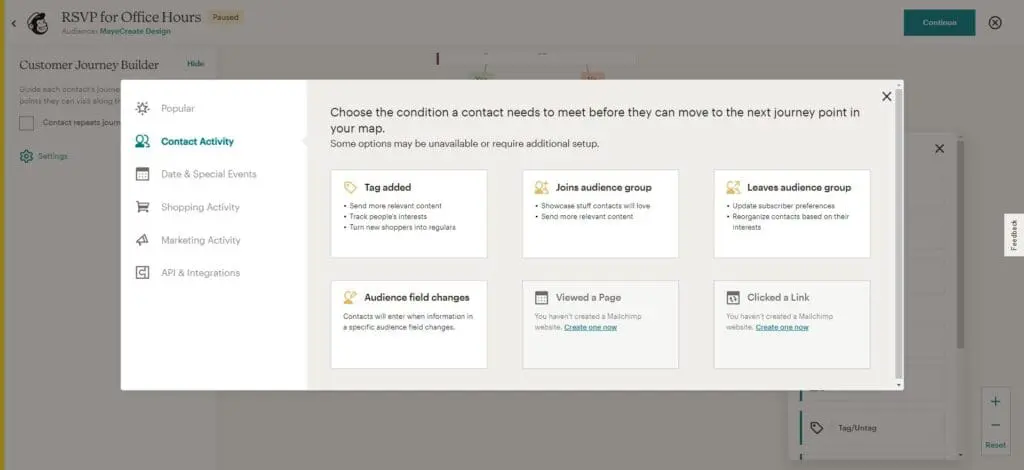
To add points in the Journey you click the “+” and complete the options in a popup menu.
Automation Features Screenshots
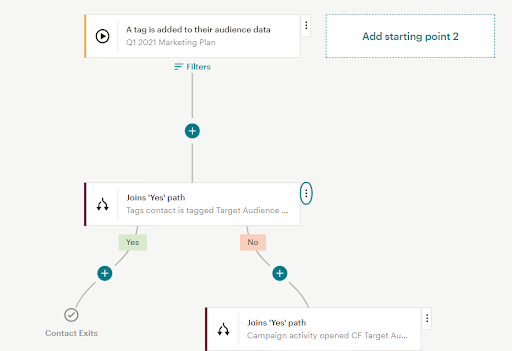
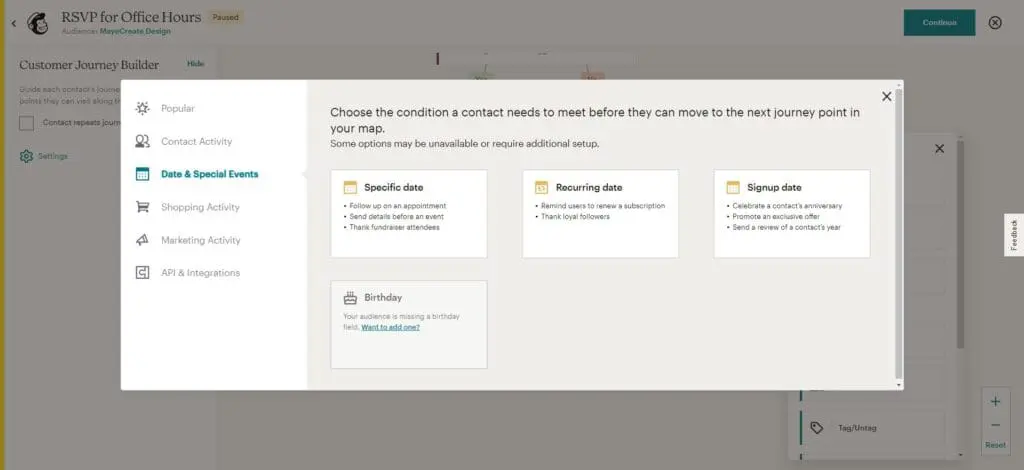
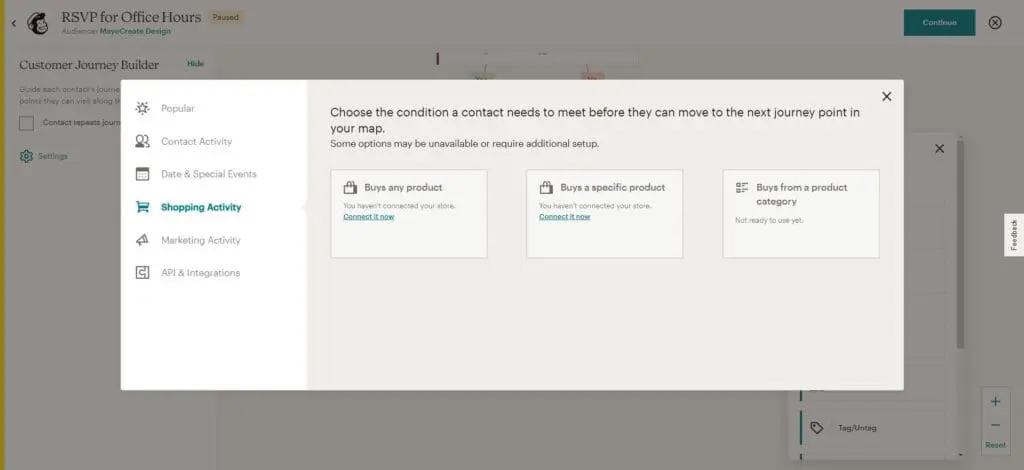
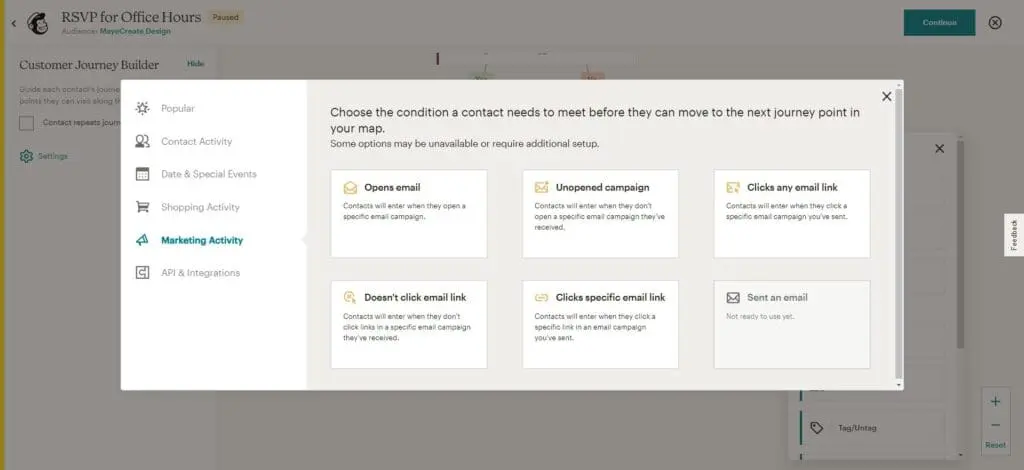
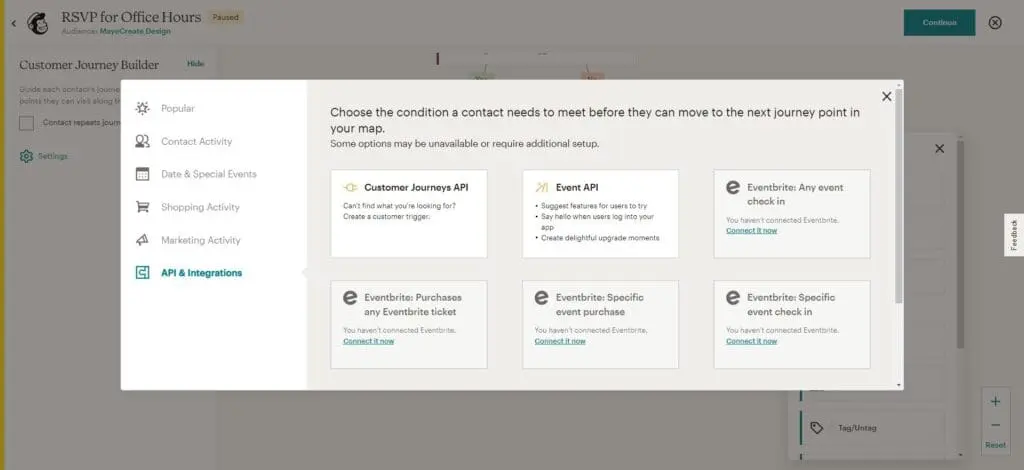
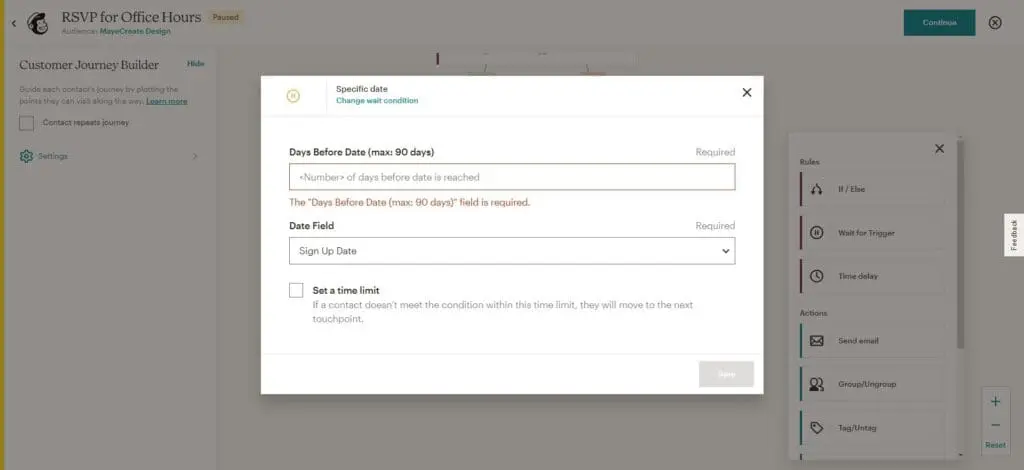
If you delete a point in your Journey in MailChimp it will delete all the points after it…ALLL OF THEM. I about cried when I did this and had to rebuild all the emails and every lovin thing just because I decided to simplify the Journey.
Lesson learned. Don’t just build crap as you go. Write the emails in another document, and plan out your Journey ahead of time so you have a clue where you’re going and can re-coop if you blow it up by needing to delete a step along the way.
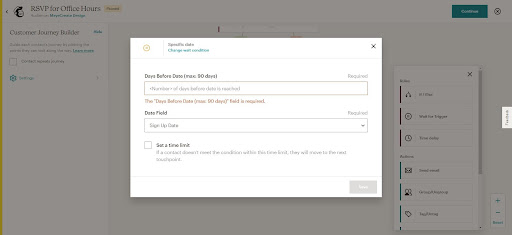
You can’t set a journey point to start a specific day…it’s not possible. UNLESS the date is in a subscribers user profile.
Integration
MailerLite
This is the saddest part about MailerLite (other than the stinking laggy load time drama). It just doesn’t integrate with everything under the sun.
For example my forms plugin, Formidable, doesn’t have an extension to tie the two together. MAJOR bummer.
I have to either build my form in MailerLite, which limits form functionality dramatically or use Zapier to connect the two. So I Zap. And I use Airtable as my data tracking dashboard so I just Zap it all in there at the same time, so that’s not so bad. I was Zapping from MailChimp into the tracking sheet to start anyway. What’s one more Zap…just another thing to test and set up and hope it doesn’t break.
MailChimp
MailChimp connects to almost everything I swear. I have integrated it in the darndest ways with client websites. And for some of you that may be the big deal breaker. If it syncs with your system and makes life easier then this will be the right choice for you.
I have even used MailChimp as a pass through from one application to another. The applications didn’t integrate with each other but they both integrated with MailChimp so it was the communicator and it did a good job of it too.
Reporting
MailerLite
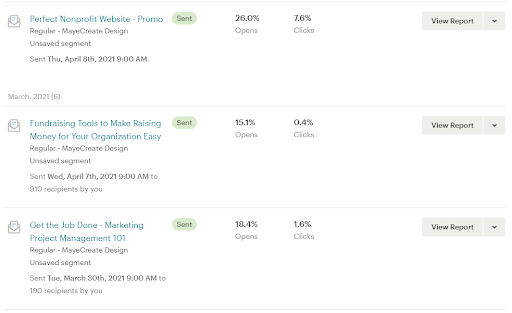
All the information is displayed in a pretty compact view that’s easy to skim.
The RSS feed emails are displayed in line with all the other sent emails and while they don’t tell you the title in the display it does show it when you scroll over the email so that’s enough for me.
MailChimp
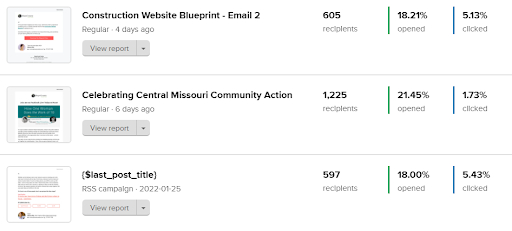
The view is pretty spread out so I don’t get as much information at a glance, it’s not as easy to skim as MailerLite.
The RSS feed emails are all reported into one email that you have to click on to view data. Which is good and bad. Good because you can see the overall performance metrics easily. Bad because you can’t tell which email had what subject line and you have to click on each and everyone to see the data.
Single Email Reporting
The main features for reporting are the same. Both systems show:
- Emails sent
- Opened
- Clicked
- Unsubscribed
- Who clicked
- What links were clicked
- Click maps
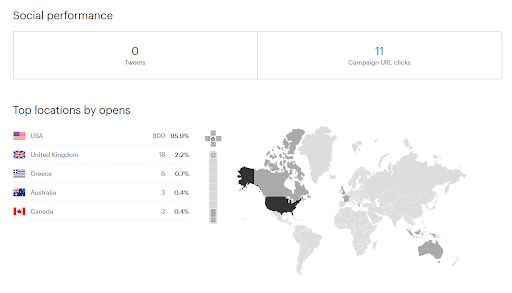
- Opens by location (only available in paid plans)
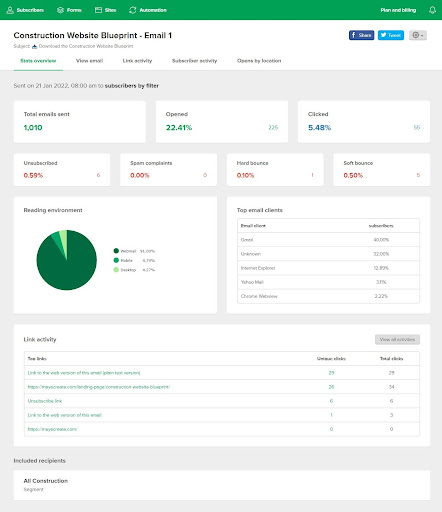
MailerLite
MailerLite offers a quick overview of data and you can dig deeper for more.
Data shared by MailerLite that MailChimp doesn’t share:
- Top email clients
- Reading environment data
MailChimp
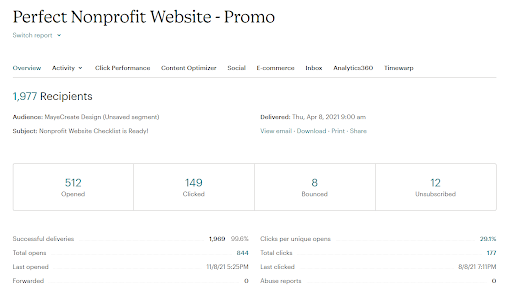
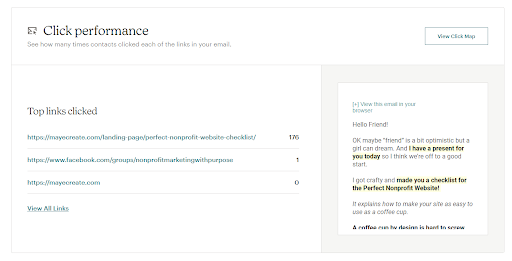
MailChimp gives you a TON of data to process and you can click to get more.
Data shared by MailChimp that MailerLite doesn’t share:
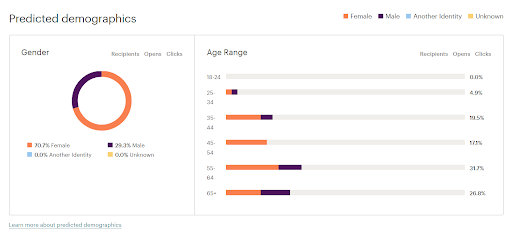
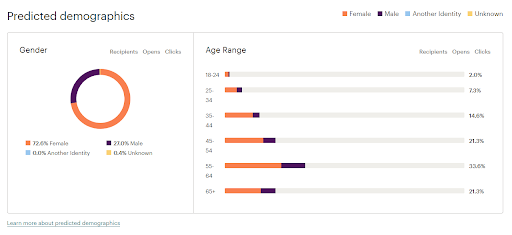
- Predicted demographics
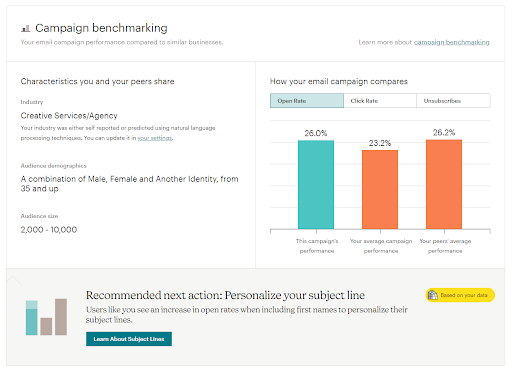
- Campaign benchmarking
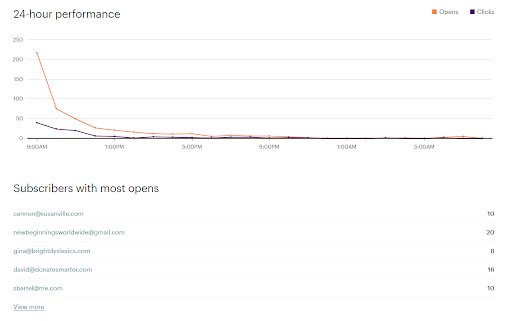
- 24 hour performance
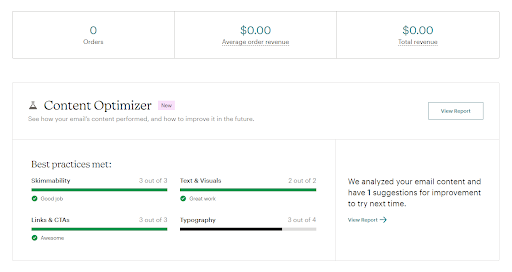
- Content optimizer (an upgraded feature that may be useful to new email marketers and forgetful folks like myself who love a good reminder).
RSS Feed Emails
MailerLite
MilerLite is the least flexible of the two, you can adjust items in your RSS feed email using the user interface but there’s not an option to customize it using code. There are many customization options, just not nearly as many as you can with the code blocks in MailChimp.
Adding content from your site manually from an RSS feed is also really easy
Setting up the RSS feed email is also quick and painless.
MailChimp
MailChimp is VERY flexible with the presentation and setup of their RSS emails. The most flexible system I’ve worked with. But you have to have a clue to customize it. You’ll need some experience with CSS, a little HTML and some common sense to use their code blocks to customize your RSS feed email.
Creating the basic email is not difficult. But customizable options using the user interface are limited.
You can do it on the free plan.
Pricing
Both have free starter plans. This isn’t a total comparison but a chart of what I feel like are the big features you may be looking for in your email marketing system.
| MailerLite | MailChimp | ||
| Contacts | 1,000 | 2,000 | |
| Sends | 12,000 / mo | 10,000 / mo | |
| Audiences (Segmentation) | Unlimited Groups | 1 Audience | |
| Templates | No | Basic Email Templates | |
| Email Scheduling | Yes | No | |
| A/B Testing | Yes | No | FREE PLAN |
| Surveys | Yes | Yes | |
| Landing Pages | 5 Landing Pages | Landing Pages | |
| Automation | Yes | 1-Step Automations | |
| Social Posting | No | Yes | |
| Social Ads | No | Yes | |
| Email Support | Yes | 30 Days | |
$10 PER MONTH Unlimited Emails 1,000 Subscribers All Features but Add-ons | $11 PER MONTH 100,000 Emails 3 Audiences Pre-built Email Templates A/B Testing | STARTING PACKAGE | |
| $15 PER MONTH Unlimited Emails 1,001-2,500 Subscribers All Features but Add-ons | $17 PER MONTH 120,000 Emails 500 Subscribers 5 Audiences Send Time Optimization Advanced Automations | UPGRADED PACKAGE |
Now go forth and find what’s right for you.
MillerLite VS MailerLite
Everytime I typed MailerLite I thought about typing MillerLite instead just to see if anyone would notice. To that point I might just need cold beer now after all this email system comparison therapy. Hopefully this braindump of a review will help you decide if one of these two email marketing systems should even be on your list of potential candidates.
Remember – whatever you choose should make your life EASIER! It doesn’t matter how fancy something is, if the system isn’t easy to use or just bloats your process it’s not the right thing.
Happy hunting!
Who Manifested This Madness?

This fabulous human, that's who.
Monica Maye Pitts
Monica is the creative force and founder of MayeCreate. She has a Bachelor of Science in Agriculture with an emphasis in Economics, Education and Plant Science from the University of Missouri. Monica possesses a rare combination of design savvy and technological know-how. Her clients know this quite well. Her passion for making friends and helping businesses grow gives her the skills she needs to make sure that each client, or friend, gets the attention and service he or she deserves.