Using Facebook to Promote Your Construction Company
June 22, 2022
CONSUME CREATIVELY
This content is available in:
AUDIO
TEXT
In our ongoing construction marketing benchmarks survey we ask construction companies, “How are you meeting people and finding new hires?”
Not surprisingly, many said social media. And survey participants all agree Facebook or LinkedIn are the best networks to be on.
Which makes sense because there are TON of people on Facebook, making it a great place to promote any business, even your construction company.
Research compiled by Hootsuite shares that 69% of Americans over 18 use Facebook, and it is the most popular social network for users aged 35-44.
To this day, it’s the platform where you’ll reach the widest variety of people.
What’s to gain from Facebook? It’s supposed to be “dead.”
Facebook may seem a bit old school since it’s been around for a while now.
Here’s the thing, people have been trying to kill Facebook off for years.
Every three months or so, I swear there’ll be a headline like “Facebook is Dying, and No one Uses It.”
However, we can log on to Facebook and find that’s just fundamentally not true. If you’re trying to reach anyone in their mid-30s and above, it’s the platform they are most likely to be on the most often.
Facebook is also your best bet to reach many people quickly and consistently.
This means there’s definitely a place for your construction company, especially if you are trying to talk about projects you’re working on, gain new business or hire new staff.
Crafting your Facebook Strategy
- Creating a Facebook Page
- Reviving a Dormant Page
- Building a Following
- Get People to Interact with Your Content
- Evaluating What’s Working
If you don’t already have a Facebook Page for your company, you’ll need some prep work.
First, ask yourself if you will be the one managing your account. Or are you going to bring in other people to help? Figure out who your Facebook team is.
[Check out a podcast we released called, Who should be doing your social media? if you need help creating your team!]
You don’t want to start a Facebook Page with an Admin who’s never online or doesn’t think to check it because they won’t keep it updated. Make sure you’ve got a solid team and a plan before starting.
Here are some questions to help jumpstart your plan.
- What are your goals for your Facebook presence?
- Who are you trying to reach?
- How often do you want to post?
- What kinds of things do you want to post?
Consider prepping some of your content beforehand, even two to three months’ worth.
Review it, and then don’t worry about it. It’ll be on autopilot, and you can update it as time goes on.
Now, you have a plan and some ready-to-go content for your new Page.
1. Creating a Facebook Page
- To make a Page, you’ll open Facebook to your timeline.
- There’ll be a little button on the side of your screen that says Pages. The icon is an orange flag. Click on it.
- One of the options on the next page will be Create a New Page. Go ahead and click on it.
- Give your Page a name, which would be your company name in almost every case.
- Next, pick a category. On Facebook, you can pick up to three categories to describe your business. They can be things like highway, paving and asphalt surface construction. These categories give people coming to your Page a good idea of what you do.
Facebook is considering itself a search engine these days and trying to compete with Google. It may actually be outranking Bing if we’re honest with ourselves. People do go and look for services on Facebook. If you have the right categories set, it’s easier for you to be found, especially in your area. - Give your Page a description. The description is a good place to recycle copy from your homepage or the About page on your website. You don’t have to write a new description. Instead, use something you know works and does a good job describing what you do. From there, you’ll be asked to add a profile photo and a cover photo.
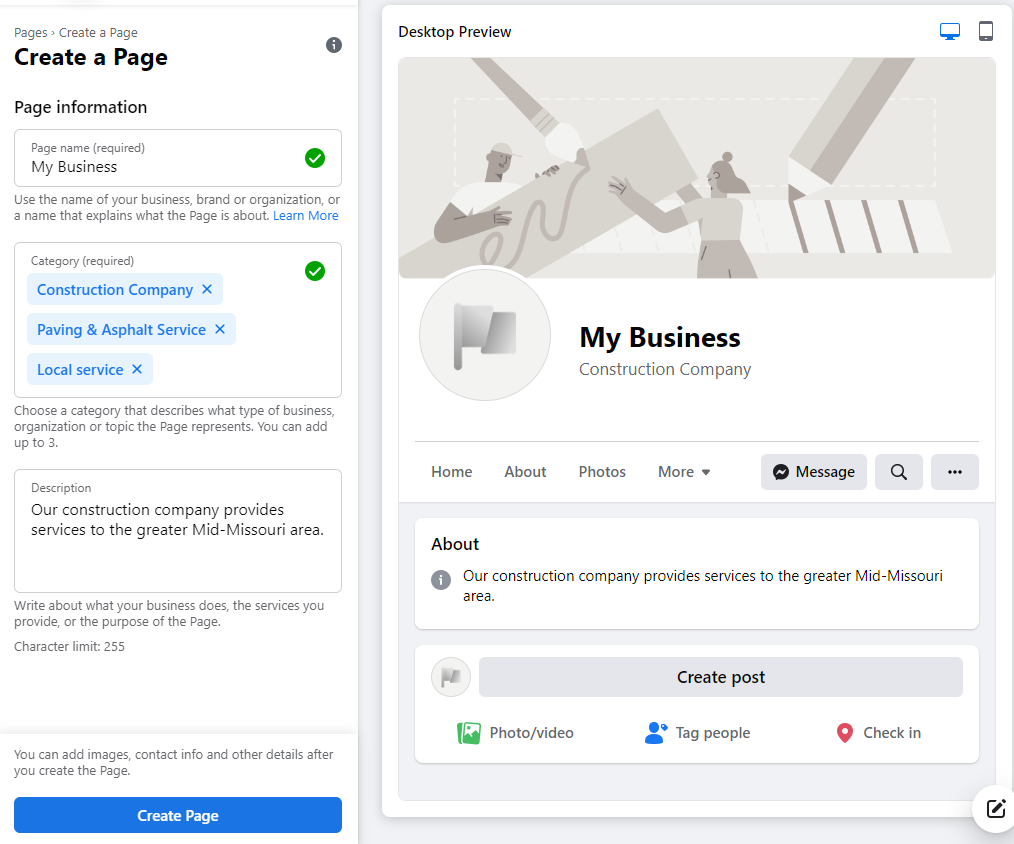
Choose the right photos to show off what you do and what you care about.
- Upload a profile photo. If it fits in the designated space, using your company logo is the best practice for profile photos for businesses. Your profile image is what goes on everything you post on Facebook. Even if someone’s not on your Page, having your logo with a post they see will let them know who posted it.
- Choose eye-catching, high-quality photography for your cover photo.
This does not mean you need to hire a photographer. A solid cellphone photo is going to be great. Think bright colors and sharp images that fit within the space recommended for a cover photo.
Facebook changes recommended image size frequently, so double-check the size recommendations before uploading anything.
You should change cover photos at least quarterly, especially if you have something seasonal like snow or fall foliage in the picture. When you change your cover image, you’ll get a little bump of promotion from Facebook.
If you are focused on hiring, make sure you use pictures of people in your cover photo. It shows you’re a people-centric company, and respect those who work for you.
*Bonus tip* With any images you post to Facebook, make sure everyone in the photos is following whatever rules go along with the site they’re working on. It’s come up with a couple of clients we’ve been speaking with recently, for example, making sure they’re wearing a vest and hardhat if required by the job site. If they’re not, don’t post those photos. - After the photos are uploaded, hit the button to create your Page.
- Fill in your contact information. You’ll then be prompted to fill in other information like your web address, phone number, and hours.
2. Reviving a Dormant Page
If you have a Page established already, but haven’t used it in a while, some people say you should start over again. However, if you already have people following you, it may be better to try and revive what you have.
Check for life signs before cutting ties and starting over.
Maybe it’s been around six to nine months since you’ve posted. Put a couple of posts out there with new fresh content talking about someone who got promoted, someone you hired or an award you won. Those are all things that are, on an active Page, going to get good engagement. Put a few of those out there, and see if your audience responds. If no one does anything with the new content, it might be dead, Jim. You can move on, start over and find a new audience.
If you get some interaction, maybe you get a comment or two, or someone shares the post, you know your Page can be revived. You’ll just have to get back into a consistent publishing schedule.
For a little bit, you may need to publish more frequently than your normal schedule to let people know that you are still here and putting out content.
Facebook hates inactive accounts, so if yours hasn’t been posted to in a bit, it may take a minute for people to start seeing your content again.
Another strategy would be to boost a post.
To jumpstart your Page, you can boost some of your older content if it’s evergreen, meaning it’s relevant at any time. When you start putting money behind posts, be sure you are boosting it to an audience similar to those who already like your Page. You can even boost it to people who already like your Page and get it out in front of them again.
3. Building a following
Get staff buy-in.
You can’t expect people who aren’t directly connected with your company to like what you’re posting and like your Page if your staff doesn’t. You have to have internal buy-in. Let your team know you have a Page, and they should like and interact with it.
Have everyone invite their friends.
Go into the Page, click the Invite button and invite the people who work for you directly through Facebook. They’ll get a notification, and most people I know don’t read what Pages they’ve been invited to. They’ll just say, “okay, sure, we’ll follow that.”
Once your people have liked your Page, encourage them to invite their family, friends and coworkers who you weren’t Facebook friends with to expand your audience. It’s a good, organic way to reach out to the people you already have.
I know at MayeCreate, we have gotten nice, big jumps in our Page following when we invite our friends, which is so simple, but we don’t think about it all the time.
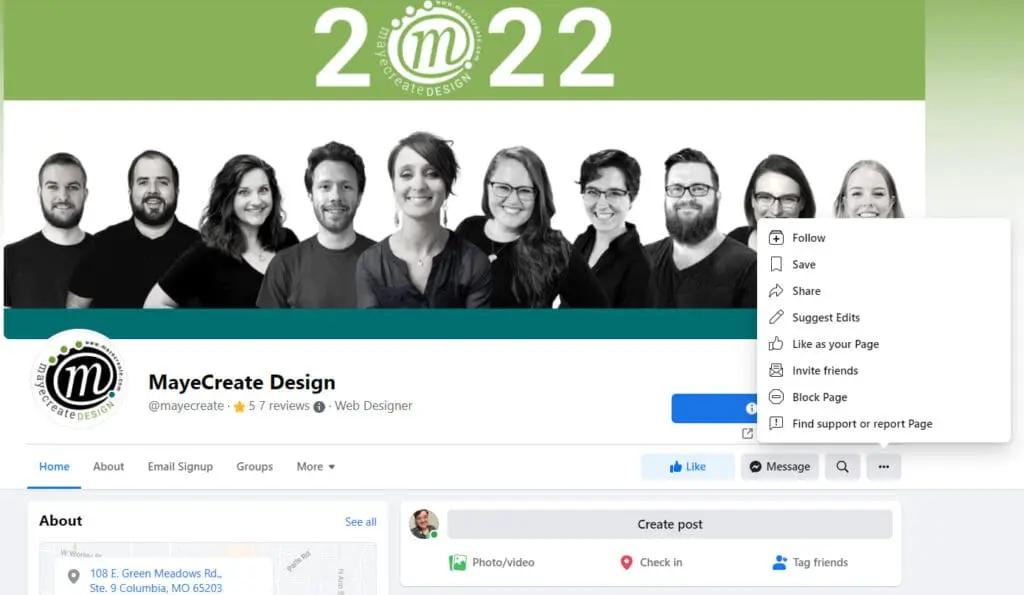
Think about what you have at your disposal you can leverage to get Facebook followers.
If you have regular team meetings, you can ask your team to open up their phones and go like the company Facebook Page. If you were having an event, you could do the same thing.
If you’re posting about one of your clients, make sure you tag them in the post and then send them an email letting them know when you’ll be featuring them on your Page and ask them to share it.
You can also advertise.
Facebook has different goals you can set when advertising and boosting posts. You can choose to get more clicks, get more likes, get more visitors to your website, whichever goal makes the most sense for where you’re at with your Page. Again, choose an audience that is either a lookalike to the people who already follow your Page, or create a specific audience.
For example, if you’re looking to meet potential hires, think about who’s following your Page and their age and other demographic information. This can work especially well if you’re looking to meet new people who might be potential hires because they likely fit into a relatively specific demographic and interest set.
A few real people will always be better than hundreds of fake people on Facebook and in life.
A good thing to remember is steady, consistent growth is always better than sudden, exponential growth. Many times, those hundreds of new followers who showed up overnight will never interact with your Page. Or, three months from now, you’re back down to just a few followers because they were bots.
4. Getting people to interact with your content
The impressions metric is how many times something was looked at or served, whereas engagement is when someone takes an action.
Even though impressions may seem like the more important of the two , engagement is the metric to watch to keep content in front of your followers and show posts to even more people. High impressions on a post are usually a result of good engagement.
Engagement is what Facebook calls people interacting with what you post. Don’t assume all your engagement comes from people clicking through links to your website. Likes, comments, video views and shares are also types of engagement.
How to create content people engage with is a mystery we’re all trying to figure out. But after managing client Facebook accounts for years and reviewing their data month after month we do know some things consistently do well.
Focus on people-centered content.
People want to know about your people. Facebook loves to show photos and videos of people. Think about how you can feature what’s going on with your company from a person perspective. Do you have a cool project? If so, the post could be a photo of one of the people who worked on it and a quote from them about how working on the project went for them or what the project’s goals were.

Highlight your participation within your community.
A fun community engagement thing you participated in would do amazing on Facebook. We had a client who did an angel tree over the holiday season and had some photos of their staff wrapping presents. People loved it. We got tons of comments, and people shared it with their friends.
While it seems a little counterproductive because it’s not specifically about what you do or directing traffic to your website, it’s keeping people interested. Once you have them interested, you can sprinkle in the more salesy content.
Show off the work you do.
Some of our favorite emails to receive from companies we work with are the ones that say, “Hey, we blew some stuff up this week. Here’s the video.” We’ll sit and watch it multiple times because it looks cool. Then we’ll type something up to go with it and post it on Facebook.
If you’re doing any sort of mining or blasting, people want to see it. It’s a really cool part of your job to share.
Another cool thing is drone footage. If you’ve got a big quarry or a plant, and have overhead shots or video from a drone showing the whole scope, definitely post it.
People are interested in what you’re doing every day. However, if all they ever see are photos of your heavy equipment, that will not capture their attention for long. Give them a little variety and show where you work. People like nature and interesting landscapes, so consider using that to promote the message of what you do.
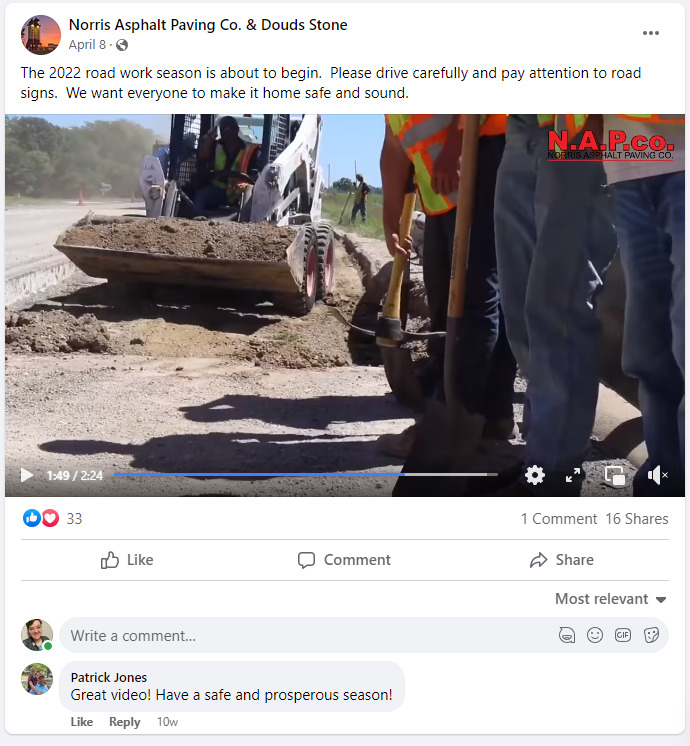
Employee engagement is your biggest asset online when you’re hiring.
For a long time, the message was if the only engagement you get is from your employees, you’re not doing it right. It’s not true anymore.
If you are trying to use Facebook to hire, it is okay to see your employees continually interacting with your content. If they’re interacting with it, it’s more likely to be seen by their friends, which is what you want, to meet more people like the awesome people who already work for you.
Facebook Job Posting Etiquette
If you are posting open positions on Facebook, you have to monitor the conversations in Messenger. We’ve had clients who posted about jobs on Facebook and got a great response and needed to monitor their chat regularly to respond in a short amount of time. Once you open up the conversation on Facebook, be prepared to continue the conversation on Facebook. Don’t expect to move into an email.
Also, if a job posting has gotten a lot of interest and you’ve gotten comments and messages about it, post an update when you hire someone. Either edit the original post to say this position has been filled, thank you for everyone who applied, or post a separate update. Otherwise, you will continue to get comments and messages about the job opening.
Stay interesting but relevant.
At MayeCreate, we have experimented with human stories, like what are our favorite shoes or what are our favorite beverages. By looking at the analytics, we’ve found those posts are too far off of the center point for our audience. They’re more likely to interact when we post about helpful apps we use, which makes sense because apps are somewhat related to our business.
When we post about going to trade shows, people will interact with that content. When we post thank yous, people interact.
Don’t go so far away from your core values you miss the point of sharing at all. For example, “meet our team” is great content. “Meet our team’s pets” may be a step too far unless you’re an animal rescue organization or you have office dogs. Stay within your company culture and brand.
5. Evaluating what’s working
As mentioned earlier the primary metric for evaluating what’s working is engagement. It’s great if many people see the content, but if they’re not doing anything with it, you could be posting anything, and it wouldn’t matter.
See if you’re getting engagement, and then figure out what kind it is. Ask yourself questions to evaluate what’s happening.
- Do you get a lot of likes and then nothing?
- Are people clicking the links you post?
- Are you getting comments?
- Are they positive or negative?
- Are people asking questions, and are you responding?
Responding to questions in your comments is another great way to build engagement. If someone asks you a question, answer, and answer publicly. Unless they’re complaining, then let them know publicly you will send them a message and handle the issue.
Dig a little deeper.
After looking at your big picture engagement metrics and patterns take a look at which part of your audience is interacting with your content.
Let’s say you’ve got great engagement, and your target audience is men, ages 20 to 40, but when you look over your data, you find everyone engaging with your page are women 50 to 70. In that case, you’ve got good engagement, but it’s not the people you’re trying to talk to. You’ll need to reevaluate the type of content you’re sharing to get closer to what your target audience is actually interested in.
Experimenting is ok.
Go a couple of months with a particular approach, and then assess how that’s working for you. If it’s not, try something new.
You might find your company can be a little funnier on social media than you thought. Or maybe you’ve gone a little too lovey-dovey about your employees, and it isn’t resonating with your audience. Feel free when you notice those things to shift and make a change.
The thing with social media is that while your posts on Facebook stay on your Page for as long as you have them up, what you posted a week ago, a day ago, isn’t necessarily popping up in your audience’s timeline. And they aren’t looking at your page on repeat. So if you posted something that didn’t quite work, you could just try again the next day.
If you want a more in depth explanation of how to review your social media data check out our blog post/podcast combo Digging into Data Part 2 – Reviewing Social Media Data.
So there you have it.
How to use Facebook to promote your construction company in a nutshell.
Creating and using a Facebook Page can be a great asset for your company as long as you build a following, post engaging content, evaluate what you’re doing and try new things.
Remember, Facebook is just another tool for you to use to promote your business. Its success all depends on how you make it work for you.
Who Manifested This Madness?

This fabulous human, that's who.
Monica Maye Pitts
Monica is the creative force and founder of MayeCreate. She has a Bachelor of Science in Agriculture with an emphasis in Economics, Education and Plant Science from the University of Missouri. Monica possesses a rare combination of design savvy and technological know-how. Her clients know this quite well. Her passion for making friends and helping businesses grow gives her the skills she needs to make sure that each client, or friend, gets the attention and service he or she deserves.