Can you trust the average session duration metric?
January 22, 2015

CONSUME CREATIVELY
This content is available in:
TEXT
One of the most commonly referenced metrics found in a Google Analytics report is Average Session Duration; session meaning the time visitors spend on your website. We look at this metric as a way to interpret how engaged visitors are with web content. Generally speaking, visitors who stick around on your site for a longer period of time are more deeply engaged with the content you’re sharing.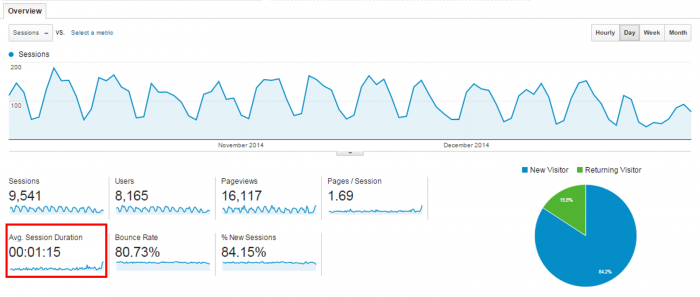
While knowing how long people last on your site is important, the time that pops up under “Avg. Session Duration” on the Audience Overview page of your report is highly unreflective of the true behavior of your visitors. Why? Because the number is not specific enough. It’s an average of averages of averages! And even those averages are skewed by extreme outliers in the data.
For instance, when someone opens a webpage but then walks away for 15 minutes without actually looking at it…sure that improves your website’s average session duration but it doesn’t reflect the time visitors actually spend interacting with your site.
With this in mind, your first instinct might be to just ignore this metric when evaluating the performance of your website. That’s not a good idea either, especially because there IS a way to combat this issue thanks to the advanced segmentation capabilities of Google Analytics allowing you to measure session duration at a deeper level.
Digging Deeper: How to Access More Reliable Data
The process of retrieving more reliable average session duration data takes a little bit more effort than simply referencing the statistic on the Audience Overview page but it’ll be worth your while to gather deeper level data and understand the true behavior of your website visitors. Take a look at average session duration after narrowing down your search to a specific traffic source and region. Follow along for step by step instructions and see how the data varies as we dig deeper.
Average Session Duration By Traffic Source
After logging in to Google Analytics, the first thing you’ll need to do to access a more accurate analysis of the time visitors spend on your website is segment your data by traffic source. Mosey on over to the Acquisition tab and click on All Traffic. From here you’ll see a data table similar to this one: Average session duration can vary greatly depending on the traffic source. Visitors who found our website from organic searches in Google spent an average 50 seconds on the site while those who accessed it from a link in an email spent 4 minutes and 14 seconds on the site.
Remember to adjust the timeframe for your dataset using the drop down menu in the top right corner of the page.
Average Session Duration By Traffic Source and Country
To uncover an even more precise session duration time, focus on a single traffic source in a specific region. By clicking on “google/organic” in the previous view you can isolate visitors who find the site through Google searches and then add “Country” as a secondary dimension.
Click on Secondary dimension.
Click on Users.

Scroll down and click on Country to unveil a screen like the one below. 
Notice how breaking down the data by traffic source and region changes the average session duration statistic from 1 minute and 15 seconds (as presented on the Audience Overview page) to 1 minute and 1 second (for organic Google searches within the United States).
Average Session Duration By Traffic Source, Country and State/City
The United States as a region is still a pretty broad area to analyze. Dive even deeper to see how session duration varies by state or city. While you could simply change the secondary dimension to City instead of Country, doing so will initiate a display of cities from all around the world instead of just within the United States.
To zoom in on the average session duration data related to a specific city while also isolating organic Google searches as a condition, add and save a new segment to the report. Down the road you can select this segment to access the corresponding data quickly.
Start by clicking the “Add Segment” box near the top of the page. Next, click on the red box that says “+ New Segment”.
 From the menu on the left, click on the “Conditions” tab under “Advanced”.
  Now start adding the specific conditions you want to view data for. In this example I’ve added three filters: one for organic Google searches (traffic source), one for the United States (country), and one for Columbia (city). If you are interested in seeing how long visitors from a certain city stay on your website after finding it through an organic Google search on, say, their iPhone, you can also create a filter for a specific mobile device.
  Be sure to label the new segment you create with a name that clearly describes the conditions you filtered for. For example, “Google Organic Traffic from Columbia.”
Upon clicking the save button you’ll be automatically redirected back to the audience overview page where you’ll see a comparison between all sessions and your newly created segment. Notice the difference between the overall session duration and the session duration for the segment you filtered for.

There’s a big difference between the average session duration on a website reading 1 minute and 15 seconds compared to almost 4 minutes.
This example just goes to show why you should take average session duration based on all sessions with a grain of salt.
Just Keep Digging
To see an even more detailed report breaking down visit duration within the segment you created, navigate to Audience → Behavior → Engagement within Google Analytics. While the previous report displayed the overall average session duration for the specific segment, this report will show exactly how many sessions on your website took place between more exact time increments.  Digging to this level gives a clearer, more accurate representation of how long visitors are on your site. While this segment averaged 3 minutes and 50 seconds on our website, 45% of those sessions only lasted between 0 and 10 seconds. At the other extreme, about 7% of the sessions in this segment lasted longer than 10 minutes.
To Trust or Not to Trust the Session Duration Metric
The big take away here is that the average session duration metric can only be trusted on a contingent basis. If you put in the effort to segment the visits to your website and analyze the session durations on a deeper level then you can place a lot of trust in the metric. But if you rely on the average session duration metric presented on the Audience Overview page then the metric you report can’t be trusted and you might want to do a little further research.
Who Manifested This Madness?

This fabulous human, that's who.
Monica Maye Pitts
Monica is the creative force and founder of MayeCreate. She has a Bachelor of Science in Agriculture with an emphasis in Economics, Education and Plant Science from the University of Missouri. Monica possesses a rare combination of design savvy and technological know-how. Her clients know this quite well. Her passion for making friends and helping businesses grow gives her the skills she needs to make sure that each client, or friend, gets the attention and service he or she deserves.